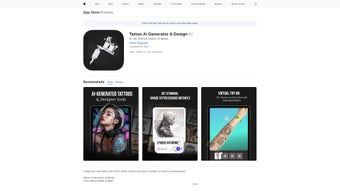

Download Tattoo AI Generator Design – AI‑Powered Tattoo Design Tool, Free Trial, Secure & Easy
Overview
Tattoo AI Generator & Design, marketed under the short name AINK, is a cutting‑edge web‑based application that blends artificial intelligence with creative tattoo artistry. Built for both seasoned ink enthusiasts and first‑time tattoo seekers, AINK offers a complete sandbox where users can sketch, customize, and preview tattoo concepts without ever picking up a needle. The platform’s core strength lies in its AI‑driven generator, which instantly produces original artwork based on simple prompts, style selections, or uploaded reference images.
From intricate tribal patterns to delicate script, the tool adapts to a wide spectrum of aesthetic preferences. AINK also includes a virtual try‑on feature that maps designs onto a 3‑D model of your own skin, giving a realistic sense of size, placement, and colour before you commit to a permanent decision. All creations can be saved to the cloud, exported in high‑resolution formats, and shared directly to social media or sent to a tattoo artist.
Subscriptions are managed through the App Store, offering flexible monthly or yearly plans that unlock unlimited design generation, premium fonts, and priority updates. Regular releases ensure the AI stays current with the latest tattoo trends, while the interface remains intuitive enough for users of any technical skill level. In addition, AINK provides robust privacy controls, encrypted data transfers, and a collaborative workspace that lets artists and clients exchange feedback in real time, making the entire design workflow smoother and more transparent than traditional sketch‑and‑show methods.
Key Features & Capabilities
What truly separates AINK from generic drawing apps is the depth of its AI integration and the breadth of tools built around the creative process. Whether you are looking for rapid concept generation, fine‑tuned vector editing, or a realistic preview on your own skin, the platform delivers a unified experience that reduces the time between idea and execution. Below is a comprehensive list of the most valuable capabilities, each designed to empower both hobbyists and professional tattoo artists.
- AI‑Powered Design Generator: Input keywords, style tags, or reference photos and receive dozens of unique tattoo concepts in seconds.
- Virtual Try‑On: Real‑time 3‑D skin simulation lets you preview size, colour, and placement on any body part.
- Custom Sketching Tools: Vector‑based brushes, layers, and symmetry options for hand‑drawn designs.
- Typography Art: Convert quotes, names, or dates into stylized lettering with over 200 font families.
- Cloud Library & Export: Save unlimited designs, download PNG, SVG, or PDF files, and share via a single click.
- Collaboration Hub: Invite artists or friends to comment, edit, or approve designs within the app.
- Regular AI Updates: Monthly model improvements keep the generator aligned with emerging tattoo trends.
- Cross‑Platform Access: Web portal works on desktop browsers, while native iOS & Android apps provide on‑the‑go creativity.
- Secure Subscription Management: Handled through Apple’s App Store, ensuring privacy and reliable payment processing.
- Multi‑Language Support: Interface available in English, Spanish, French, German, and Japanese.
Installation & Usage Instructions
Getting started with AINK is straightforward, whether you prefer a full‑featured desktop environment or the flexibility of a mobile app. The following step‑by‑step guide walks you through account creation, feature navigation, and best‑practice tips that help you extract the maximum value from the AI engine.
Getting Started on Desktop (Web Version)
1. Visit the official AINK website and click the Start Free Trial button. No download is required; the application runs entirely in modern browsers (Chrome, Edge, Firefox, Safari).
2.
Register using an email address or sign in with Apple/Google for instant access.
3. After logging in, you’ll be greeted by the dashboard where you can choose between AI Generator, Sketch Pad, or Typography modules.
4. To generate a design, type a brief description (e.g., “Japanese koi fish with waves”) and select a style tag (Traditional, Neo‑Traditional, Watercolor, etc.).
Press Generate and watch the AI present 6‑12 variations.
5. Click any thumbnail to open the editor, where you can adjust line weight, colour palette, or add extra elements using the vector tools.
6. For virtual try‑on, select the Preview tab, upload a photo of the target body part, and the app will automatically map the tattoo onto the skin, allowing you to rotate and scale it.
7.
Satisfied? Hit Save to Cloud, then Export to download a high‑resolution file or share a link directly with your tattoo artist.
Installing the Mobile App (iOS & Android)
1. Open the App Store (iOS) or Google Play Store (Android) and search for “Tattoo AI Generator Design”.
2. Tap Get/Install.
The app requires iOS 13+ or Android 8.0+ and roughly 150 MB of storage.
3. Launch the app and sign in with the same credentials you used on the web version to sync your cloud library.
4. The mobile UI mirrors the desktop experience but adds a touch‑optimized canvas and camera integration for instant try‑on without uploading a separate photo.
5.
Use the built‑in AI prompt field to generate designs on the go. When you find a concept you like, pinch‑to‑zoom for fine‑tuning, then tap Save & Share to export or send directly to your favorite tattoo studio.
6. Subscription billing is handled via the App Store, so you can upgrade to the premium plan with a single tap.
Tips for Getting the Best Results
- Be Specific: Include style, subject, and mood in your prompt (e.g., “minimalist black‑line rose with watercolor shading”).
- Use Reference Images: Upload a photo to guide the AI’s composition and achieve more accurate anatomy.
- Iterate: Generate multiple versions, then mix‑and‑match elements using the layer editor.
- Leverage Try‑On: Test the design on different body parts before finalizing size and placement.
- Collaborate: Share a private link with your tattoo artist for professional feedback.
Compatibility, Pros & Cons
Tattoo AI Generator Design runs on any modern web browser (Windows 10+, macOS 10.14+, Chrome, Edge, Safari, Firefox) and offers native mobile apps for iOS 13+ and Android 8.0+. The cloud‑based architecture ensures that your work is always synced across devices, and there is no need for heavy local processing.
The broad compatibility means you can start a design on a desktop at home, continue tweaking it on a tablet during a commute, and finalize the artwork on a smartphone while waiting for an appointment. This seamless transition is especially valuable for professional tattoo studios that need to show clients multiple revisions quickly, as well as for hobbyists who may only have occasional access to a computer.
Pros
- AI Speed: Generates high‑quality designs in seconds, saving hours of manual sketching.
- Realistic Preview: Virtual try‑on reduces the risk of placement regret.
- All‑In‑One Suite: Sketching, typography, and AI generation are unified under a single account.
- Cross‑Device Sync: Work on desktop, continue on mobile, and never lose progress.
- Secure Subscription: Handled through Apple’s ecosystem, providing reliable payment and privacy.
- Extensive Export Options: PNG, SVG, and PDF formats cover most professional workflows.
- Active Community: Users share templates and style guides, fostering inspiration.
Cons
- Subscription Model: No permanent free version; users must maintain a monthly or yearly plan for unlimited access.
- Learning Curve: While intuitive, mastering the layer editor and AI prompt nuances can take a few sessions.
- Internet Dependence: Cloud rendering requires a stable connection; offline work is limited to the mobile sketch pad.
- Limited Export Formats: Advanced vector editing may require export to external software like Adobe Illustrator.
- Price Point: At $9.99 per month, the cost may be a barrier for casual users.
Frequently Asked Questions
Below you’ll find answers to the most common queries about AINK, ranging from pricing and data security to technical requirements. This information should help you decide whether the tool fits your creative workflow and give you confidence when you start using it.
Can I use Tattoo AI Generator Design for free?
A free trial is available for new users, giving you 5 AI‑generated designs and full access to the virtual try‑on feature for 7 days. After the trial, a subscription is required for unlimited use.
Is my personal data safe when I upload photos for the try‑on?
Yes. All uploads are encrypted in transit (HTTPS) and stored securely on AWS servers. Images are automatically deleted after 30 days unless you save them to your private cloud library.
Can I export the AI‑generated designs for editing in Illustrator?
Designs can be exported as high‑resolution PNG or as scalable SVG files, which are fully compatible with Adobe Illustrator, CorelDRAW, and other vector editors.
Does the app work offline?
The mobile sketch pad works offline, but AI generation, cloud sync, and virtual try‑on require an internet connection.
What payment options are accepted for the subscription?
All subscriptions are processed through the Apple App Store, so you can pay with your Apple ID balance, credit/debit cards, or Apple Pay. The same subscription is reflected across iOS, macOS, and the web portal.
Conclusion & Call to Action
Tattoo AI Generator Design (AINK) stands out as a comprehensive, AI‑driven platform that bridges imagination and reality for tattoo lovers worldwide. Its blend of rapid design generation, realistic virtual try‑on, and robust sketching tools eliminates much of the guesswork traditionally associated with custom ink. While the subscription model may deter casual users, the value delivered—especially for artists and serious clients—justifies the cost. If you’re ready to explore limitless tattoo concepts, streamline your design workflow, and see exactly how a piece will look on your skin before committing, download Tattoo AI Generator Design today and start your free trial. Unlock your creativity, collaborate with professionals, and turn every idea into a masterpiece you’ll wear proudly.



.png)



